What happens when a reading physician/radiologist encounters a bone mineral density (BMD) scan that requires reanalysis? Perhaps the regions of interest (ROIs) need adjustment or a vertebra should be removed from analysis.
We’ve observed a variety of situations. Sometimes a post-it note is attached to the scan printout and the printout is sent back to the technologist. Perhaps the physician walks down the hall and explains what needs to be done to the technologist. In any case, it is easy for these scans to fall through the cracks.
Reanalysis of scans is built into BoneStation’s workflow. During the review process the reading physician has an option to request a reanalysis (see this post for more details regarding the review process). Doing so initiates a series of events.
- The reading physician is presented with a form where he/she types in the details of what needs to be done.
- The form is sent, in an email, to the technologist that performed the scan.
- The status of the exam in BoneStation is changed to Being Reanalyzed and appears in an Awaiting Reanalysis queue in BoneStation.
- When the technologist sends the scan back to BoneStation they are placed back on the Ready to be read queue.
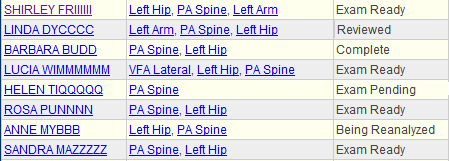
BoneStation also shows the workflow status of recent exams. The screen shot above demonstrates work to be done and where each exam is in the process. Each participant (technologist or reading physician) can then focus on their tasks in moving the exam through the process.
- A technologist will be interested in Exam Pending, which means that BoneStation is awaiting for a scan(s) – in this case a hip scan. When the hip scan arrives the exam goes to Exam Ready.
- Exam Ready indicates the exam is ready to be reviewed. Exams that are at Ready status appear on the Review List.
- Being Reanalyzed means the reviewing physician has requested a reanalysis.
- Reviewed means a report has been created and it needs to be distributed and/or printed.
- Completed means the report has been distributed – typically to the EMR.
BoneStation’s workflow facilitates how busy bone density departments work. Scans needing reanalysis are an intrinsic part of quality reporting and are handled efficiently.
 Cardea Technology’s Bone Densitometry Blog