Workflow for BMD Scans Needing Reanalysis

What happens when a reading physician/radiologist encounters a bone mineral density (BMD) scan that requires reanalysis? Perhaps the regions of interest (ROIs) need adjustment or a vertebra should be removed from analysis.

We’ve observed a variety of situations. Sometimes a post-it note is attached to the scan printout and the printout is sent back to the technologist. Perhaps the physician walks down the hall and explains what needs to be done to the technologist. In any case, it is easy for these scans to fall through the cracks.

Reanalysis of scans is built into BoneStation’s workflow. During the review process the reading physician has an option to request a reanalysis (see this post for more details regarding the review process). Doing so initiates a series of events.

  • The reading physician is presented with a form where he/she types in the details of what needs to be done.
  • The form is sent, in an email, to the technologist that performed the scan.
  • The status of the exam in BoneStation is changed to Being Reanalyzed and appears in an Awaiting Reanalysis queue in BoneStation.
  • When the technologist sends the scan back to BoneStation they are placed back on the Ready to be read queue.
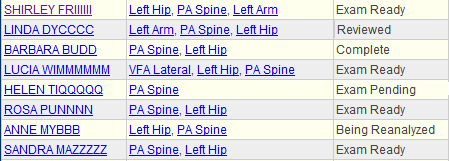
BoneStation also shows the workflow status of recent exams. The screen shot above demonstrates work to be done and where each exam is in the process.  Each participant (technologist or reading physician) can then focus on their tasks in moving the exam through the process.

  • A technologist will be interested in Exam Pending, which means that BoneStation is awaiting for a scan(s) – in this case a hip scan.  When the hip scan arrives the exam goes to Exam Ready.
  • Exam Ready indicates the exam is ready to be reviewed. Exams that are at Ready status appear on the Review List.
  • Being Reanalyzed means the reviewing physician has requested a reanalysis.
  • Reviewed means a report has been created and it needs to be distributed and/or printed.
  • Completed means the report has been distributed – typically to the EMR.

BoneStation’s workflow facilitates how busy bone density departments work. Scans needing reanalysis are an intrinsic part of quality reporting and are handled efficiently.
DXA Reporting With Dictation: 3 Problems

Introduction

Not much has changed in the dozen years since we wrote about DXA and PACs. Dictation is still a widely used tool, along side PACS, in reading bone density scans.

There are better ways to read DXA scans that minimize errors and produce better reports.

We have observed three problems with dictation that can easily be solved with a modern solution, such as BoneStation.

Errors capturing DXA data

A DXA body density scan produces quantitative data, including clinically BMD, T-score, and Z-score. DXA readers will typically dictate these values to a report along with an interpretation.

The dictation process is a source of error.  Research has found speech recognition software error rates of at least 7%.

Using modern tools, such as BoneStation, there is no need to dictate this information.  BMD data can be captured automatically from the DICOM transmission of the scan. We talk about this in this blog post.

Tedious To Dictate Elements of a Good DXA Report

There are many components to a high quality bone density report, beyond the BMD data mentioned above. The International Society of Clinical Densitometry (ISCD) defines elements of a bone density report in its recommendations.

It is tedious for many readers of BMD scans to dictate all the elements of a high quality report. Often times this information is omitted. Items such as DXA machine make and model, FRAX risk factors, change in BMD and other clinically relevant information will be lacking from reports.

Time Consuming to Perform Calculations

It can be time consuming for a DXA reader to calculate useful BMD related values, such as change in BMD with prior scan, change in BMD with baseline, and least significant change (LSC).

Automated reporting software, such as BoneStation, can easily produce reports with change in BMD and LSC. In addition, BoneStation can automatically fill in other relevant data, such as DXA machine make and model, FRAX score, FRAX, risk factors, etc.

See our video on ISCD Report Compliance and BoneStation produced reports

Conclusion

Dictation is a widely used method to produce bone density reports today. It is fraught with problems, many of which also apply to transcription and templates. More modern methods exist, that can reduce errors while simultaneously improving quality and efficiency.

Rules of Interpretation with Fractures

In last week’s post we talked about how BoneStation automatically generates an assessment. A couple of sample sets of rules were provided for BMD. This week we’ll extend those rules to include fractures.

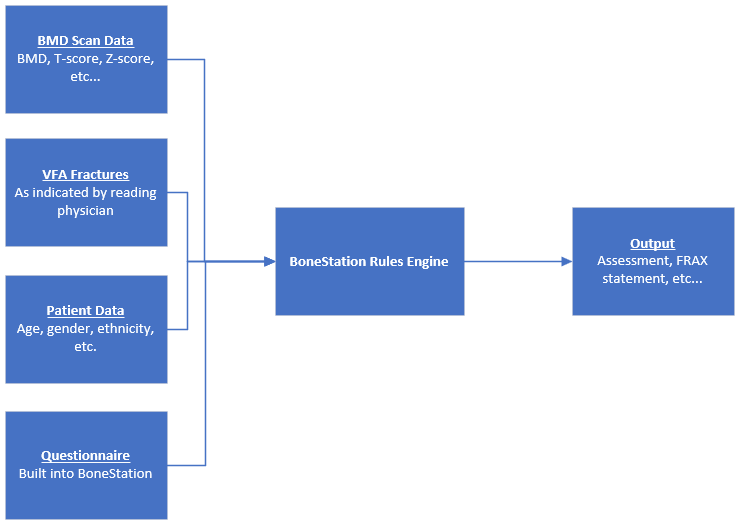
As a review, BoneStation’s rules engine takes inputs from three sources: BMD scan data, patient data, and online questionnaire. It generates output, which is an assessment.

When adding fractures an additional input is needed: the VFA scan. More specifically, vertebral fractures as noted by the reading physician (using BoneStation) are used.

Here is an updated diagram depicting the rules engine.

Before we show the updated rules for VFA, it is important to note:

  • In BoneStation there are four choices for indicating the presence of a fracture on VFA: Yes, Maybe, No, and Indeterminate.
  • Fractures may be indicated on the questionnaire – as patient reported. See sample questionnaires below for examples of how fractures may appear in questionnaire form.

Only the rules for normal bone density (T-score ≥1.0) are displayed below. Showing all the assessment categories will be too lengthy. The rules for the other categories would be similar.

The original BMD rules used these inputs:

  • Age
  • T-score
  • Z-score

For fractures we added:

  • QN Fx = Fracture indicated on the questionnaire
  • VFA Performed = Yes/No – if a VFA was performed
  • VFA FX = Fracture indicated on VFA

The sample rules above represent one way to automate the assessment of bone density scans. There are many variations.

BoneStation’s rules engine is very flexible. Rules, questionnaire, and output (assessment) text may all be customized.

Here are some sample questionnaires.

Rules of Interpretation

BoneStation is a web-based reporting system for DXA based bone densitometry. In many of our blog posts we mention that BoneStation requires no transcription and no dictation. That is because BoneStation automatically generates a suggested assessment.

What is meant by that? How does it work?

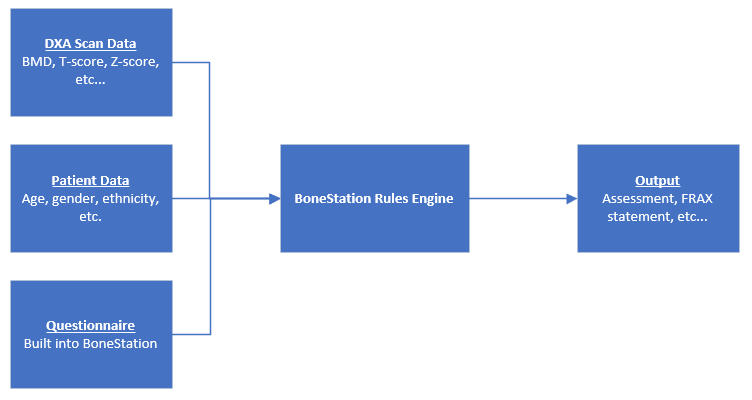
BoneStation combines three inputs:

  • DXA Scan Data – The bone mineral data from the DXA scan
  • Patient Data – Information about the patient
  • Questionnaire – Online questionnaire that is built into BoneStation

The scan data, patient info, and questionnaire answers are fed into a rules engine. The engine outputs the assessment text, which is displayed to the reading physician as a suggested assessment. The reading physician can accept the assessment or alter it.

A simple set of rules may look like this, where the T-score and Z-score are the lowest values for all measured sites:

The above rules make use of information that is available from just the DXA scans (T-score and Z-score) and patient (age). One common variation on this set of rules is to incorporate the gender and menopausal status of women. The rules can be adjusted to look like this, where the menopausal status is indicated on the questionnaire.

BoneStation is very flexible. The questionnaire, rules, and (output) assessment text are all customizable. Some BoneStation customers’ rules consist of more than 50 rules when factoring in fractures (VFA) and other patient conditions.

Here are some sample questionnaires:

In our next blog post we’ll look at how fractures and VFA can be factored into the above rules.

Bone Density Reporting and SaaS?

What is SaaS and what is its relevance to bone density reporting?

SaaS stands for Software As A Service. The financial model and logistics behind SaaS may be compelling for bone densitometry given low reimbursement rates.

A key characteristic of SaaS is that users pay for only what they use. Also startup costs are typically minimal.

With SaaS software the same fully featured software is available regardless of the size of the company using the software. BoneStation, for example, is a SaaS software package for reading bone density scans. The set of features is the same for all customers regardless of size of the practice. Practices performing 200 scans a month are using the same software as those performing 1000 scans a month.

There are other cost savings to SaaS. For example, SaaS software packages usually include support and upgrades. With the traditional model, software packages frequently have costly annual maintenance fees (typically priced at 10% to 20% of the original software). And upgrades are an extra cost too.

There are other benefits to SaaS.

Software based on the SaaS model is often times “cloud based”, meaning it runs in a web browser. There is no special client software to install on each user’s computer. This implies convenience, in that the software can be used on any computer with a browser. Installation and support are easier and less costly also.

Software As A Service is a newer model for offering technology and software. It provides many advantages, in terms of price and convenience – appealing characteristics for bone density practices running on tights budgets.

There is No Need to Re-Enter DXA Data When Reporting

Many bone densitometry practices re-enter patient and DXA scan data when creating reports.  Accuracy is critical because interpretation is based on this data.  Key patient information includes gender, date of birth, and ethnicity.  Important bone mineral density data includes BMD, T-Scores, and Z-Scores. 

Physicians and their staff often re-enter the data manually from the DXA printout into templates.  Sometimes reports are transcribed.  Radiologists typically dictate the numbers into a report.  All of these are error prone.

This data re-entry step is completely unnecessary.  DXA machines support DICOM, which is an electronic format that contains all the patient and BMD data.  While BMD numbers are burned into the DICOM image and can be viewed.  The DICOM format also contains the BMD data within discrete fields.  Software can recognize and extract this information!  We have touched upon this point in prior postings such as these: The Evolution of Bone Density Report and Bone Density Reporting and PACS.

The benefits of bone density specific reporting software, such as BoneStation, become apparent with electronic availability of DXA data.  Software can calculate change in BMD, highlight if change is significant, calculate a FRAX score, and even suggest an interpretation. In addition, the data can be displayed on a report in a way that is desirable and visually appealing.

Computerizing the handling of DXA data not only reduces errors, but it increases efficiency, and shortens turn-around time of reports.

Advantages of an online Questionnaire for DXA-based bone density reporting

BoneStation is an enterprise class bone density reporting solution.  It makes bone densitometry practices more productive by streamlining the workflow of technologists, physicians and administrators.

The assessment for osteoporosis and fracture risk became more complicated when FRAX was introduced about ten years ago.  In addition to the DXA measurements, the patient’s medical history had to be considered when interpreting bone density scans.

FRAX is built into BoneStation’s web-based interface.  When using BoneStation, the DXA machine’s questionnaire is not used.  Instead BoneStation’s online questionnaire is used and BoneStation calculates a FRAX score.

This provides many advantages over using the DXA for FRAX.

  • Technologists and physicians can view and/or modify the questionnaire from anywhere as long as they have access to BoneStation.
  • The FRAX score appears on the report along with the indicated risk factors (from the questionnaire).
  • The questionnaire is readily available to the reading physician during review.  The reading physician can even modify the questionnaire.  The FRAX score generated by BoneStation will be adjusted.  There is no need to have the technologist modify the questionnaire at the DXA and regenerate the FRAX score.
  • Questionnaire’s are saved with each bone density report and can be recalled at any later time.
  • BoneStation has the ability to provide a warning if a questionnaire has not been filled out for a patient.

The workflow for questionnaires is straight-forward in BoneStation.

  • The technologist typically fills out the questionnaire (but this is not always the case).  The questionnaire is stored in a Questionnaire Queue and assigned to the scans when they are transmitted to BoneStation.
  • During review, the reading physician has access to the questionnaire and can even modify answers on the questionnaire.
  • When the reading physician finalizes the study, the questionnaire is saved in BoneStation along with the report.
  • Both the report and questionnaire are available to be recalled at a later time.

Click here for more about bone density imaging workflow.

Next time the patient has a bone density test, answers from the prior questionnaire pre-populate the new questionnaire that is used for the visit.

BoneStation includes a standard questionnaire, which is sufficient for FRAX.  Questionnaires may be customized for a bone density practice.

An online questionnaire has an additional advantage in research environments.  With all data being stored centrally in BoneStation, it is easy to perform data mining.

BoneStation and ISCD Recommendations For Bone Density Reporting

The International Society for Clinical Densitometry (ISCD) publishes recommendations for DXA based bone density reporting.  BoneStation makes it easy to create reports that comply with these guidelines.

This quick moving video shows the guidelines, from the ISCD website, along side sample reports created with BoneStation, as each guideline is highlighted.

Click here to watch the video.

Optimizing Bone Densitometry

We have encountered some interesting ways in which bone density specialists want to understand their practices.  The goal is typically to optimize operations, improve quality, and increase business.

While BoneStation is a great tool for creating DXA based bone density reports, it also can be used to understand the operations of a bone density practice.  BoneStation collects a wealth of information regarding the processing of bone density studies, and that information can be used in a variety of ways.

Here are some interesting questions BoneStation users have inquired about:

  • Which physicians refer the most patients for bone density scans?
  • What’s the turnaround time for a bone density test, where “turnaround time” is defined as the duration from scan to report finalization?
  • What’s the turnaround time for each reading physician?
  • How many scans does each technologist perform?
  • What percentage of scans must be reanalyzed per each technologist?

BoneStation is an “enterprise-class” software application.  “Enterprise-class” software is designed to be used by an organization as opposed to an individual.  BoneStation is used by technologists, reading physicians, and administrators.  As such, it captures information about the entire process of DXA based bone densitometry,

Workflow for Quality DXA-based bone density testing

Typical medical imaging workflow, as discussed in our prior post, works well in most radiology practices.  However, bone density testing via DXA is a unique form of medical imaging.  Some ways in which DXA is unique:

  • DXA produces quantitative data in addition to images
  • Accurate patient demographic information is required for an interpretation along with a FRAX score
  • Reading physicians are required to confirm proper and consistent positioning

In this posting, we’ll examine how BoneStation, a web-based bone density reporting system, provides an efficient workflow while simultaneously addressing many of the unique characteristics of DXA.   Many of the features and capabilities described below are based on experiences at high volume bone density practices over the past twelve years and with more than a half million bone density reports created at these practices using BoneStation.

DXA produces numbers, in addition to images.  PACS are not designed to deal with numbers, and dictation is tedious and error prone. BoneStation extracts all BMD data and makes them available during review.  This is described in our post, There is NO need to re-enter your DXA data when reporting.

Bone density also requires accurate patient demographic information for an assessment. If a FRAX score is being calculated, then risk factors are also required.  BoneStation verifies that information is not missing.  It can notify the technologist before an attempt is made at reading the scans.  Some examples of info may be omitted:

  • Height is often used at determining height loss.
  • Height and weight are needed for FRAX, which uses BMI as in input.
  • Ethnicity is important for interpretation.

BoneStation includes FRAX and includes an online questionnaire, which may be customized.  The questionnaire in the DXA software is not used.  There are many advantages to having the FRAX questionnaire online, as described here.  Some examples:

  • The reading physician may make changes to responses to FRAX questions during review.  There is no need to have the technologist change the answer on the DXA to have the FRAX score recalculated there.
  • BoneStation can confirm that a questionnaire has been filled in and notify staff when it is missing – before the scans are read.
  • BoneStation warns staff of inconsistencies in scan and FRAX info.  For example, a 65 year old patient may be designated as pre-menopausal.  This can be significant when menopausal status is used in determining the assessment or reporting of FRAX.

An online questionnaire may be very helpful in research settings too.  All scan and patient history information is easily accessible in real-time, which may be useful for data mining.

Here are some sample questionnaires.

So far we’ve discussed issues that occur early in the process, before scans are read.  BoneStation provides numerous workflow and quality benefits during the reading process too:

  • Images and BMD data for prior scans are available quickly and easily during review.
  • Generation of the assessment and FRAX is automatic.  This is possible because BoneStation makes decisions based on the extracted BMD data.
  • BoneStation incorporates re-analysis of scans into its workflow.  No more post-it notes or lost scan results because reanalysis of a scan was forgotten about. BoneStation tracks scans being reanalyzed.

This video demonstrates reading of a bone density study in under ninety seconds.

Here is a longer video that describes bone density reporting with BoneStation in high volume practices.

BoneStation builds upon radiology workflows while also supporting DXA specific requirements.  Both a high volume of testing may be maintained as well as quality.